Editor – Device Page
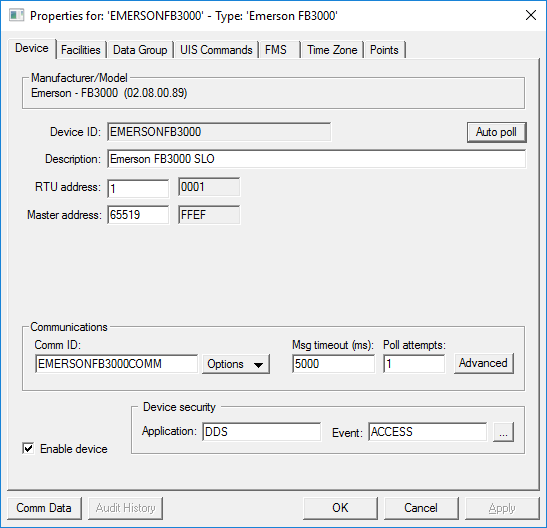
Use the Device page to view, select, and modify general device settings for a remote device. These settings are the minimum required for remote device functionality. The Device page of a remote device editor typically contains settings unique to its field device type(s) or to the EIE itself.
|
Click the thumbnail to see an example |
For more information, see Remote Device Editors.
Device Properties
The following table lists and describes specialized Device page properties for this device. See Device Page for common properties.
| Property | Description | ||||||
|---|---|---|---|---|---|---|---|
|
Device ID |
The unique identifier of an instance for this device. This free-form name must be unique in the DDS and the FAC. That is, it must be a name not used by any other communication device, import/export device, remote device, or facility. CygNet naming standards for device ID are as follows:
|
||||||
|
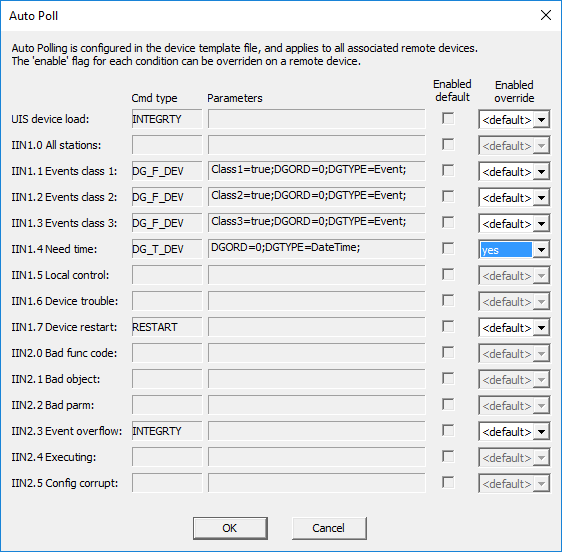
Enables automatic polling of associated remote devices as defined by IIN flags in the autoPoll element in the device template file. When auto polling is enabled and the corresponding bit is received in the IIN data from the device, the EIE automatically performs the associated configured command (Cmd type) for the remote device. The default commands and parameters for a device type are configured in the device template file. The default settings for each remote device instance can be overridden on this dialog box. Select the enabled override value from the drop-down menu for the configured command type: <default>, no, or yes.
See Polling Notes for more information about auto polling. |
|||||||
|
Description |
Displays a user-defined description of the remote device. A free-form description of the device. 32 character maximum. |
||||||
|
RTU address |
The user-specified address of the device and its hex equivalent. |
||||||
|
Master address |
The DNP3 master address and its hex equivalent. |
||||||
| Communications | |||||||
|
Comm ID |
The name of the communication device this remote device uses. Click the Options button to select from the choices in the drop-down menu. See Communication Devices. |
||||||
|
Options |
This button provides several communications-oriented options. Options are as follows:
|
||||||
|
Msg timeout (ms) |
Msg timeout (ms) displays the time in milliseconds a remote device waits for a valid response from an associated field device before timing out. This setting is not the same as similar settings on the currently active communication device and device failover settings. But these settings work in conjunction with one another. |
||||||
|
Poll attempts |
The number of times a remote device attempts to poll an associated field device until a valid response is received within the message timeout limit. If a poll is successful, no more poll attempts are made. If a poll is unsuccessful, the remote device continues to attempt polls until a valid response is received or until the Poll attempts setting is reached, whichever comes first. Note: Poll attempts for the DNP Emerson EIE are performed for all read requests. For send requests, retries are performed for a DirectOperate, but not for a SelectOperate. See Device Template File Properties. |
||||||
|
Advanced |
Click to access advanced communication device failover settings. |
||||||
|
Enable device |
Select whether to enable or disable the device. The default setting is disabled. If an invalid configuration is detected, the device will automatically be disabled. The device can be re-enabled after the invalid configuration is fixed. |
||||||
| Device security | |||||||
|
Application |
Defines the ACS security application name used to validate the users of this device. See Applications, Events, Permissions. |
||||||
|
Event |
Defines the ACS security event used to validate users of this device. Click … to select the security event. See Applications, Events, Permissions. |
||||||
|
Comm Data |
Enables you to open a modeless Communications Data Viewer dialog box. |
||||||
|
Audit History |
Enables you to view the audit trail for the device. |
||||||
Device Compliance Levels
The DNP3 protocol requires that devices meet one of four compliance levels. Some devices using the DNP3 EIE or the DNP3 Emerson EIE may be limited in their functions according to the compliance level of the device.
- Level 1 — The minimum implementation level for communication between a master station and an Intelligent Electronic Device (IED). Includes simple reads and writes and unsolicited messages.
- Level 2 — Contains the Level 1 subset plus additional features, such as accepting freeze requests on Binary Counter objects, and parsing read requests for different variation and object combinations, including Binary Input Change objects and Frozen Counter objects. Typical communication is between a master station and a large IED or a small RTU with input and output points local to the device.
- Level 3 — Contains the Level 2 subset plus additional features, such as outstation processing of a wider range of read requests, enabling and disabling unsolicited responses for Class 1, Class 2, and Class 3 objects only, and assigning and reassigning data objects to classes dynamically. Typical communication is between a master station and a more advanced RTU.
- Level 4 — Contains the Level 3 subset plus additional features, with typical communication between a master station and a medium size outstation. The additional features in Level 4 are self-address reservation, handling object group 0 (device attributes), double-bit input objects, variations with time (frozen counters and events, and AI events), floating-point variations for analog input and output, analog input deadband, and events for binary and analog outputs. At this level, the device must provide an XML version of the device profile document containing both the capabilities and current values set in the device.
Note: Devices can implement features from more advanced levels, but can only claim compliance when all requirements for a level are met. A manufacturer can claim compliance for a level as long as a request is handled correctly. For example, Level 1 compliance includes support for analog output values. If the device does not support them, but correctly returns "object unknown", then the device is Level 1 compliant.
For more specific information about DNP3 Implementation levels, see the appropriate manufacturer-provided documentation.


